

What is UI UX Design?
What Is UI/UX Design? Complete Beginner’s Guide
In today’s fast-paced digital world, where every business, app, and website is just a click away, UI/UX design is what makes or breaks user experience. Whether you’re an entrepreneur, a designer, or just someone curious about the field, understanding UI/UX design is essential in 2026. It’s no longer enough to just have a website or app—users expect intuitive, seamless, and engaging experiences. But what exactly do UI and UX mean, and how do they work together to create products people love?
In this complete beginner’s guide, we’ll break down everything you need to know about UI/UX design, from what it is and how it works, to why it’s important for your product’s success.
What is UI Design?
UI stands for User Interface, which is the visual part of the design that users interact with on a website, app, or any digital product. It’s all about the layout, colors, fonts, buttons, and images that make a product look good and easy to use. Think of it as the look and feel of the digital experience.
Key Aspects of UI Design
- Visual Design: This is where UI design gets its power. It’s about creating a visually appealing interface that’s easy to navigate. Whether it’s the color palette, fonts, or icons, good visual design attracts users and keeps them engaged.
- Typography: Choosing the right fonts isn’t just about looking good—it’s about readability. The size, weight, and style of the font can impact how users perceive your app or website. Clear and legible typography is essential for a positive UI experience.
- Interactive Elements: Buttons, sliders, checkboxes, and other interactive features need to be designed for ease of use. A well-designed button should not only look appealing but also feel intuitive when clicked.
- Responsiveness: In 2026, mobile-first design is a must. Responsive design ensures that your website or app looks great and works smoothly across different screen sizes, whether on a desktop, tablet, or smartphone.
Consistency: Consistency in design elements such as buttons, navigation bars, and icons across the website or app ensures that users don’t get confused. Consistent UI design helps create familiarity, which leads to a more comfortable user experience.
What is UX Design?
UX stands for User Experience, and while UI deals with the visual elements, UX focuses on the overall experience a user has when interacting with a product. UX is all about how the product works, how users interact with it, and how easy and enjoyable it is for users to achieve their goals.
In short, UX design is about creating a smooth, efficient, and pleasant journey for the user. It’s about solving problems, reducing frustration, and making sure the product is intuitive and accessible.
Key Aspects of UX Design
- User Research: UX design starts with understanding the users. This could be done through surveys, interviews, and usability testing. User research helps gather valuable insights into user needs, behaviors, and pain points.
- Information Architecture (IA): IA is how the content is organized and structured within the app or website. A good IA allows users to find what they need quickly without feeling overwhelmed. It’s like creating a map that guides users through the product seamlessly.
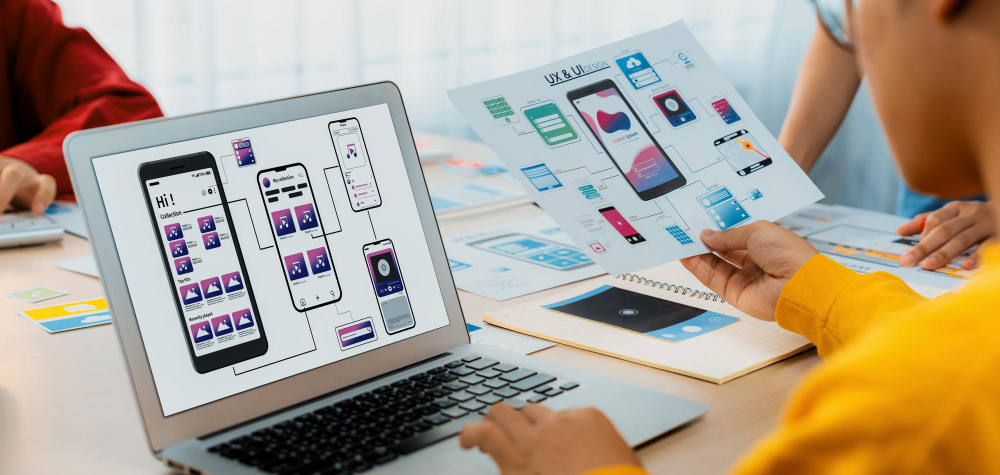
- Wireframing and Prototyping: Wireframes are basic sketches of what the interface will look like, and prototypes are interactive mockups that simulate how the final product will function. Prototypes help test and refine ideas early on.
- Usability Testing: Testing the usability of a product is crucial. It involves observing real users interact with the prototype and gathering feedback to see where users struggle. This iterative process helps improve the product before it goes live.
- User Flow: User flow is the path users take to complete a task. It’s all about making sure that users can complete their tasks efficiently and without unnecessary steps. An intuitive user flow leads to fewer errors and higher satisfaction.
Accessibility: UX design also ensures that the product is accessible to everyone, including those with disabilities. By adhering to accessibility standards, you make sure that people with visual, auditory, or motor impairments can easily use the product.
UI vs UX Design: What’s the Difference?
While UI and UX are often used together, they serve different purposes in the design process. Here’s a simple way to think about it:
- UI Design is focused on the visual aspects—what the product looks like and how it feels to interact with. It’s the design of the interface—the buttons, the fonts, the layout.
UX Design is focused on the user’s journey—how the product works, how easy it is to navigate, and how enjoyable and efficient the overall experience is.
Why UI/UX Design Is So Important for Your Product?
UI/UX design isn’t just about making something look good—it’s about creating a positive experience for users that keeps them coming back. Here’s why UI/UX design is crucial for the success of any product:
- First Impressions Matter: Your website or app’s design is the first thing users notice. If it’s difficult to navigate or visually unappealing, they might leave before they even get to know your product. A well-designed UI/UX creates a lasting first impression and builds trust.
- User Retention: A good user experience keeps users engaged. If your app or website is easy to use and navigate, users will return. A positive experience encourages loyalty, which means users are more likely to stick around and recommend your product.
- Increases Conversion Rates: A seamless UX design leads to better conversions, whether that’s a sale, a signup, or a subscription. By reducing friction and making it easier for users to complete tasks, you increase the chances of users following through.
- Reduces Bounce Rate: A confusing or poorly designed interface will likely result in higher bounce rates—when users leave the site or app after viewing just one page. A great UI/UX design keeps users on your product longer, lowering the chances of them leaving early.
- Competitive Edge: In today’s digital world, competition is fierce. If your competitors have better UI/UX design, you’ll lose out to them. A well-designed product not only meets user expectations but exceeds them, helping you stay ahead of the competition.
Builds Brand Credibility: Consistent and well-thought-out UI/UX design reflects your brand’s professionalism. When users experience a smooth and enjoyable interface, they’re more likely to trust your brand and recommend it to others.
The UI/UX Design Process: How It All Comes Together
Creating a product with great UI/UX design isn’t a one-step process—it’s a series of stages that involve research, designing, testing, and iterating. Here’s a look at the typical UI/UX design process:
- User Research: The first step in any design process is understanding who your users are. This involves surveys, user personas, and collecting insights to design around the needs and behaviors of real users.
- Wireframing & Prototyping: After gathering research, designers create wireframes—blueprints that map out the layout and functionality of the product. Prototypes are interactive models that let you test how the interface will work in real life.
- Visual Design: After wireframes are approved, the UI design team works on the visual aspects, such as color schemes, typography, icons, and buttons, creating a polished design that fits the brand’s identity.
- Usability Testing: Next, the product undergoes usability testing, where users interact with the product to identify any usability issues or friction points. Feedback is gathered and used to refine the design.
- Launch & Iteration: Once the product is live, the design doesn’t end. Continuous feedback gathering, A/B testing, and iteration ensure that the product improves over time based on real user feedback.
Tools for UI/UX Designers
Here are some popular tools used by UI/UX designers to create and test their designs:
- Figma: A cloud-based design tool that allows real-time collaboration and prototyping.
- Sketch: A vector-based design tool used for creating user interfaces.
- Adobe XD: A comprehensive design tool for wireframing, prototyping, and collaboration.
- InVision: A prototyping tool that allows designers to create interactive and high-fidelity prototypes.
- Figma: A cloud-based design tool that allows real-time collaboration and prototyping.
Why You Need UI/UX Design for Your Product
In 2026, UI/UX design is more important than ever. Whether you’re creating a mobile app, a website, or any digital product, great UI/UX design is crucial for creating an experience that your users will love. It’s about making sure the product looks good, works well, and provides users with a seamless, enjoyable experience from start to finish.
By investing in UI/UX design, you can boost your product’s usability, increase user engagement, and build a stronger, more trusted brand. So, if you’re new to this field, dive in and start learning! It’s the foundation of successful digital products, and it’s a skill set that’s in high demand.